Allocation spread
Last updated: October 21, 2026
How placement can reduce startup contention, and how to balance that benefit against hosting efficiency.
Overview
Allocation spread controls which eligible machine is chosen for each new game session. Default placement favours packing sessions onto existing machines. Wider spread gives each new allocation a broader set of machines to choose from.
It changes placement, not capacity. It does not add servers, delay startups, move existing sessions or choose a different region from the one requested.
Both fixed and percentage spread are fleet-level settings. The same configuration applies to every region in that fleet, but selection happens separately within each allocation's requested region.
Why it matters
Many games do substantial work when a process starts or a new match is prepared: loading maps and assets, initialising state, and preparing networking. If several sessions do that work on one machine at nearly the same time, they can compete for shared CPU, memory and network resources.
For affected titles, that contention can show up as slow joins, longer readiness times, early-match hitches or degraded tick performance. Bursts during launches, play tests, events and daily peaks are useful times to look for it.
A wider spread can reduce concentrated startup work by placing new sessions on more machines. It cannot guarantee an even split or prevent several requests from choosing the same machine.
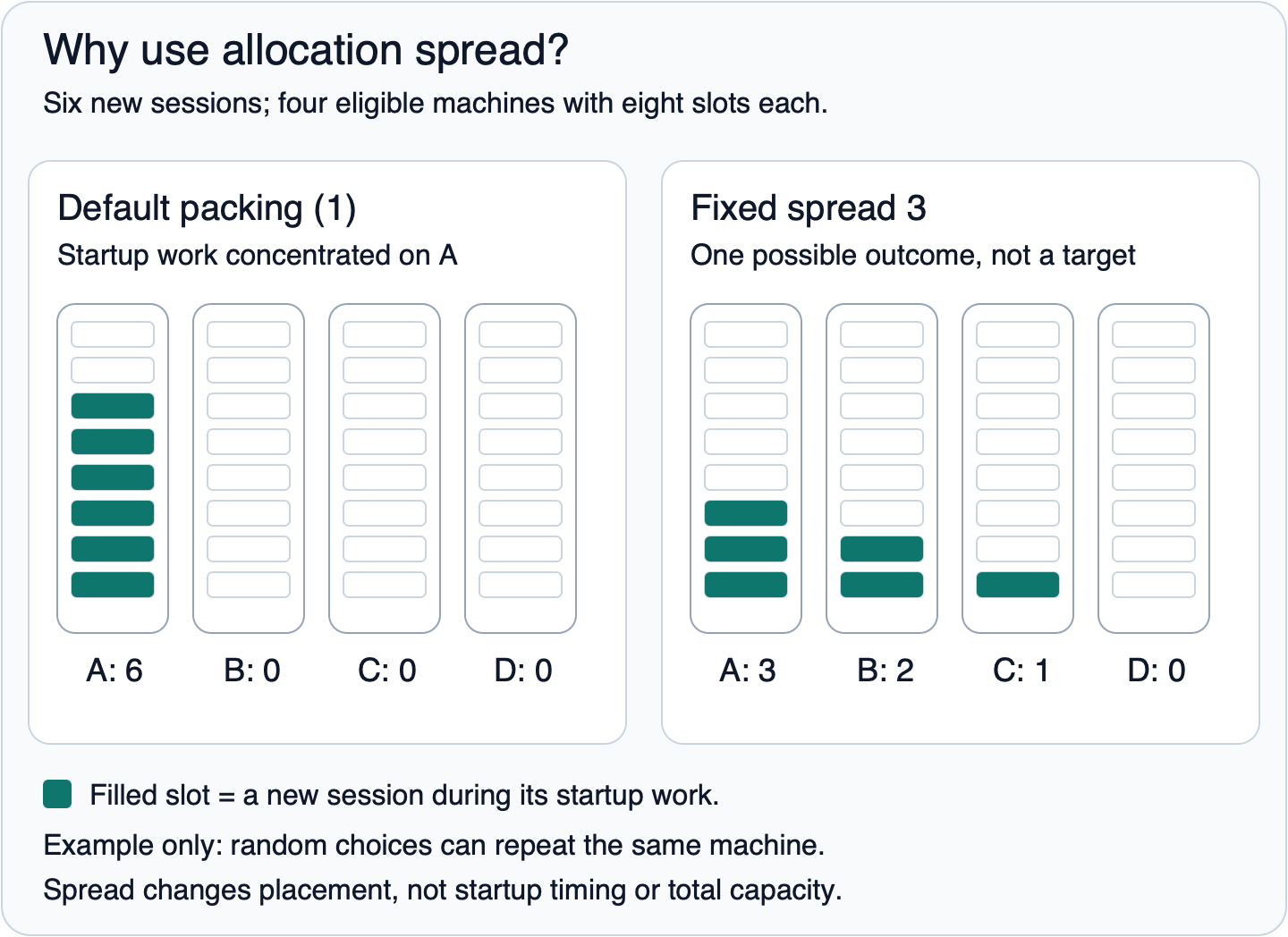
Figure 1. One possible outcome, not a guaranteed distribution. Percentage mode is unset in both examples. Each filled slot is one newly allocated session. Spread does not stagger starts in time.
A new allocation does not necessarily start a new process. On the selected machine, Multiplay prefers an available server already running the requested build configuration. Profile the work your game actually performs when it receives an allocation, as well as cold starts and restarts.
How it works
Multiplay orders eligible machines in the requested region by a placement score. That score normally favours lower-cost machines and, at the same cost, machines with fewer free server slots.
Each allocation chooses one machine from that ordered list, then an available server slot on that machine. The list changes as capacity is consumed or released.
Default packing
With fixed spread set to 1 and percentage spread unset, each allocation selects the first eligible machine in the current order.
This normally packs sessions onto cheaper, more occupied capacity before using other machines. It is a placement preference, not a promise that a particular machine will always fill completely before any other machine receives a session.
Fixed spread
Fixed spread is a whole number N, at least 1.
For each new allocation, Multiplay randomly selects a rank from 1 through N in the current eligible machine list. For example, fixed spread 3 chooses one of the first three eligible machines for each request.
It does not first choose a number of machines and then distribute a batch across them. It also does not cap the total number of machines that can carry sessions over time: the machines in the candidate window can change.
If a selected rank is beyond the available machine count, the allocator falls back to the last eligible machine. This does not create capacity, and it can skew the distribution. If there are no eligible machines, spread cannot fulfil the allocation.
Percentage spread
Percentage spread makes the candidate window proportional to the current eligible machine count in the requested region.
For each allocation, Multiplay samples a percentage from zero up to, but not including, the configured value, then converts it to an offset in the score-ordered machine list. For example:
- With six eligible machines, percentage spread 50 chooses among ranks 1, 2 and 3.
- With twelve eligible machines, the same value chooses among ranks 1 through 6.
The sampled offset is rounded down, so small pools and percentages that do not correspond to a whole number of machines can affect the boundary of the window. The value does not guarantee that exactly that percentage of machines will end up hosting sessions.
Percentage mode takes precedence over fixed mode when set. A percentage value of 0 still overrides fixed spread and selects the first-ranked machine; it does not restore the fixed setting. To use fixed mode, the percentage setting must be unset.
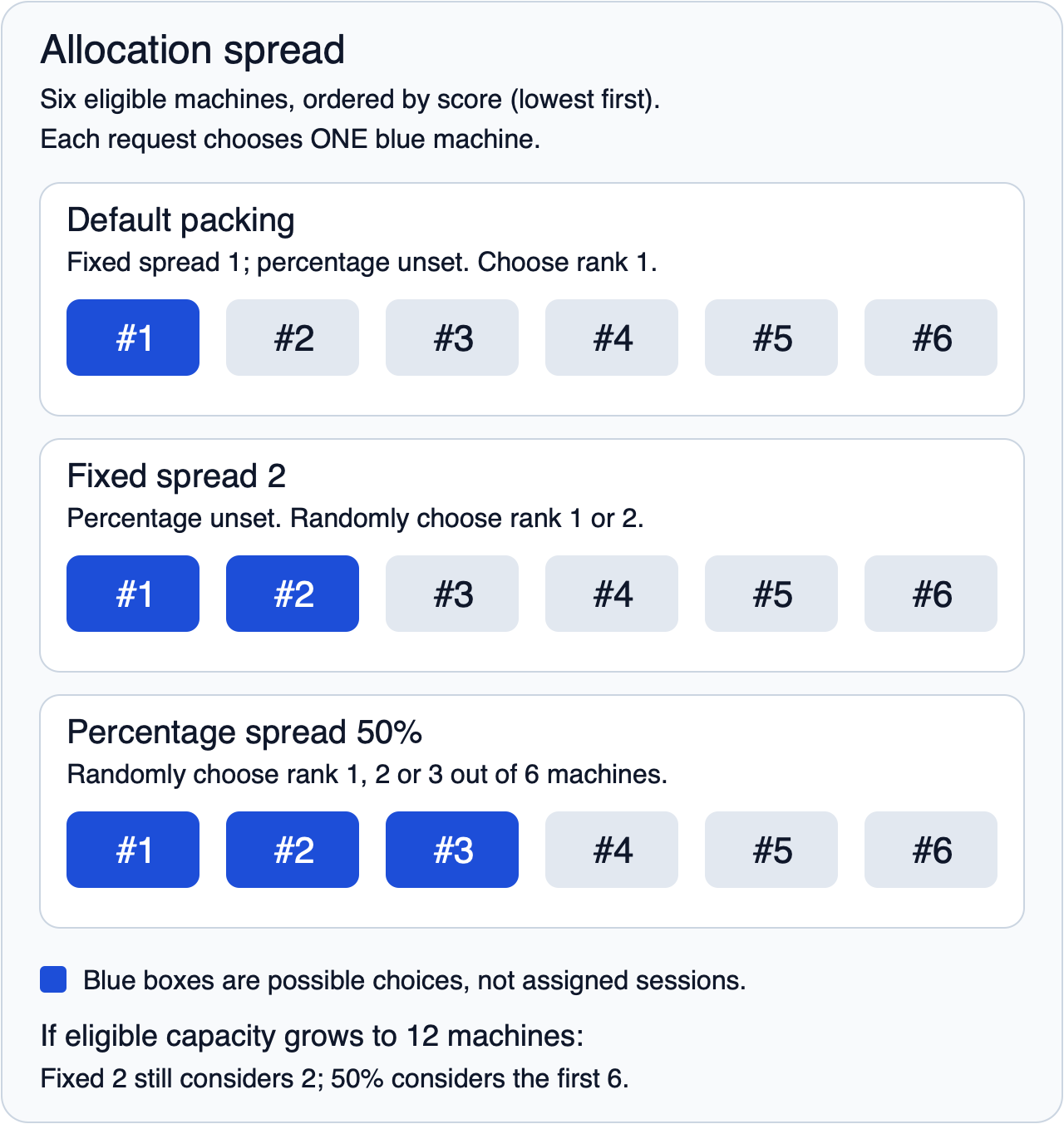
Figure 2. Each row is an alternative configuration for one request. Blue boxes are possible choices, not assigned sessions. Ranks are positions in the current list, not permanent machine IDs.
Trade-offs
Consideration | Tighter packing | Wider spread |
Startup work | Can concentrate concurrent setup work on fewer machines. | Can share setup work across more machines; random choices can still repeat. |
Player experience | Appropriate when sessions perform well at the configured density. | Worth testing when concentrated startup work affects joins, readiness or tick performance. Improvement is not guaranteed. |
Scale-down | Can leave other machines completely unused sooner. | Can keep more machines occupied, delaying when they become eligible to scale down. |
Hosting cost | Usually favours using fewer machines and lower-cost capacity. | Can retain more machines or include higher-cost candidates further down the list. |
Predictability | Selects the first currently eligible machine. | Randomised placement, not round-robin, equal balancing or live CPU-aware routing. |
Spread does not increase the resources reserved for each session or enforce separation across hardware failure domains. If a machine is overcommitted, review server density and hardware as well.
Choosing a mode and value
Work with your Technical Account Manager to choose a starting point using your game's measurements.
1. Profile startup and match preparation. Look at per-machine CPU, memory and network usage during representative allocation bursts. Compare these with player join times, readiness times and your game's tick or latency metrics. If setup is light and performance is healthy, default packing may be the right trade-off.
2. Choose a mode deliberately. A small fixed window is a bounded first experiment. Percentage mode adapts to the eligible capacity in each requested region, which can help when machine counts vary substantially.
3. Consider smaller regions and quieter periods. For fixed mode, size the value against typical eligible machine counts in smaller regions, not only your largest region. Keeping the value within that pool is a tuning recommendation, not a hard validation limit.
4. Adjust gradually. Change one aspect at a time, observe realistic bursts, and compare the result with your previous setting.
5. Watch the period after the peak. Review occupied machine counts, scale-down time and hosting cost, not just peak CPU. Reduce the spread if the extra retained capacity is not justified by a measurable performance benefit.
There is no universal value that is best for every title. Low-single-digit fixed values can be a starting point to discuss for early tests, rather than a recommendation to apply to every fleet.
Where it is configured
Contact your Technical Account Manager to review or change allocation spread. Include the affected fleet and regions, the startup or performance issue you are investigating, and recent playtest or live-traffic measurements.
These are backend fleet settings, not editable dashboard fields or options in a public allocation request. You cannot set a different spread value per region. Your account team can discuss options if regions need different handling.
Spread works alongside, but does not replace, these controls:
Setting | How it relates to spread |
Minimum available servers | The spare-server buffer the scaler works toward. It is not a guarantee of immediately game-ready sessions; a selected server may still need to start, change configuration or signal readiness. |
Server density | Controls how many server processes or slots can share a machine. Spread chooses a machine for a new allocation; it does not change that machine's density limits. |
Shutdown TTL | The idle-age threshold after which excess unused machines become eligible for shutdown. It is not a grace period for an individual game process to stop. |
Delete TTL | The idle-age threshold after which excess unused machines become eligible for deletion or de-provisioning. Retaining active sessions on more machines can delay when machines become unused. |
Allocation TTL | The maximum allocation age before automatic deallocation checks apply. It is not an idle timeout reset by player activity, nor a timeout for processing a new allocation request. |
Reaching an idle-machine TTL does not guarantee immediate shutdown or deletion: the scaler also considers its capacity targets.
## Frequently asked questions
Does a higher spread give me more servers?
No. It changes where new allocations are placed, not the amount of capacity available. Continue to size your availability buffer, capacity limits and machine density for expected traffic.
Will changing it move players already in a match?
No. Spread affects new allocation placement. Existing sessions remain on their assigned servers.
Does spread evenly balance sessions or delay startups?
No. It randomises the choice of machine within a candidate window. Requests can choose the same machine repeatedly, and starts are not deliberately delayed or spaced out.
Is fixed spread the maximum number of machines my fleet can use?
No. It limits the ranked candidate window for an individual selection when percentage mode is unset. As that list changes, sessions can accumulate on more than N machines over time.
Why are machines staying online longer after I raised the spread?
New sessions may now occupy more machines, leaving fewer completely unused and eligible to scale down. Compare the extra retained capacity with the measured performance benefit.
Why does changing the fixed value appear to have no effect?
Check whether percentage mode is set. It takes precedence, including when its value is 0. Ask your account team to confirm the effective fleet configuration.
Can I set a different value per region?
Not directly. Both modes are fleet-level configuration. Percentage mode uses each requested region's own eligible machine count, but the percentage itself remains the same fleet-wide.
Who should I talk to about changing it?
Your Technical Account Manager. They can review the effective mode, your startup profile, regional capacity and recent performance and cost measurements before recommending a change.